 Argyo Apps
Tick what you share
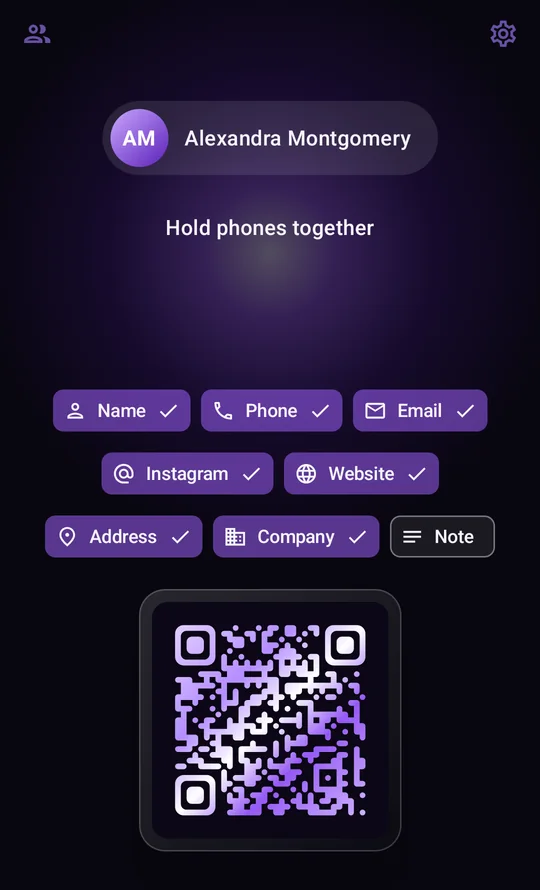
Your card holds name, phone, email, Instagram, website, address, company and a note. Switch on only the ones you want to give, each time.
A card shared with you

Contact sharing for Android
Fill in your card once. Hold two phones together and your details are shared.
Android · Free
What it does
Your card holds name, phone, email, Instagram, website, address, company and a note. Switch on only the ones you want to give, each time.
Hold two phones together. A phone with GlowTap saves you in its People list. A phone without the app opens a web page where it can save you as a contact. A QR code works as a backup.
Everyone you have swapped cards with sits in one list, ready to call or write. Supporter adds the full history.
No account, no tracking and no internet permission in the app. Your card travels inside the link itself.
Three steps
Enter your name and whatever else you want on it. You do this once.
Choose the fields for this person. The rest stays on your phone.
The other person gets your card. No typing, no app needed on their side.
Price
GlowTap is free. Supporter is a one-time CHF 2 and adds extra colours plus the full People history. Supporter options are coming.
Questions