 Argyo Apps
Follow padel scoring
Choose best-of-3 or best-of-5, advantage or golden point, and an optional super tie-break decider. Games, sets and tie-breaks update as you score.

Amazfit watch app · Padel
Keep the score on your wrist from first serve to final set, with a clear scoreboard for padel players.
Available on Zepp
Scoring from your wrist
A padel scoreboard for Amazfit watches, with match controls, timing and history close at hand.
Choose best-of-3 or best-of-5, advantage or golden point, and an optional super tie-break decider. Games, sets and tie-breaks update as you score.
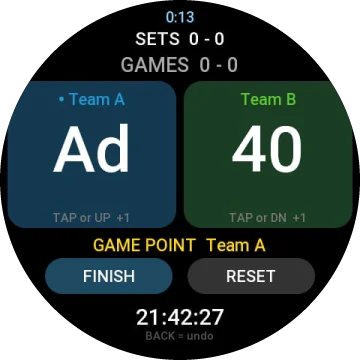
Tap either side of the screen or use the watch buttons to add a point. Hold your side to set the server, and use BACK to undo.
Completed matches are saved with set-by-set scores, serve statistics and point statistics.
A status line tells you when the next point could win a game, break, set or match.
Check the live match timer and on-court clock from the watch.
If you leave the app during play, it can reopen at the active score so you can continue.
On the watch
Questions
Compare
Padel Counter is free and made for players who only need padel scoring, including match history. Pro Counter+ covers six racket sports and adds heart-rate and swing stats, personal records and match history. Pro Counter+ costs USD 2.99 through KiezelPay; check the Zepp store for the current price and checkout total.
Available on Zepp
Explore Padel Counter and the other apps from Argyo Apps.
Needs an Amazfit watch with Zepp OS 4.0 or newer.